
16 Instagram Questions to Ask Your Followers
 Revive.Social Editorial
 The best Instagram questions to ask followers are tied to a real decision. Ask what problem needs a tutorial, which product detail is unclear, or what experience the community can share. Then use the replies, instead of treating the question as a shortcut to reach.
You can ask through a feed caption, an interactive Instagram Story sticker, a Broadcast Channel prompt where available, or a Live conversation where available. Each surface produces a different kind of response, so choose the format after defining what you need to learn. 💬
This guide gives you 16 adaptable prompts, plus a practical workflow for choosing a surface, moderating replies, and measuring useful outcomes.
Choose the surface and the answer you need
Start with the answer shape. If you need a quick preference between a few options, use a Poll or another low-friction choice format. If you need language, stories, or explanations, use a Question sticker or caption prompt. For a conversation that benefits from follow-up, consider Live or a community surface available to your account.
The original two-option Story Poll lets people choose between options while the creator can review how accounts voted.[1] It is useful for direction, but it is not a representative survey. Your respondents are self-selected people who saw the Story and chose to participate. 📊
| Surface | Best for | Response shape | Watch for |
|---|---|---|---|
| Feed caption | Visible discussion | Public comments | Moderation and context collapse |
| Story sticker | Fast feedback | Choice, text, quiz, or scale | Availability and temporary context |
| Broadcast Channel | Member prompts where available | Channel-specific interaction | Account and rollout differences |
| Live | Real-time follow-up | Comments and conversation | Moderation capacity |
Do not collect sensitive information through a public or lightly controlled surface. If the answer requires order details, health information, financial details, or private account data, direct the person to an appropriate support channel instead.
A simple formula for better Instagram questions
A useful question combines four elements: one goal, one topic, an answer that is easy to produce, and a clear reason to respond. “Which tutorial should come next: reporting or scheduling?” is easier to answer and act on than “What content do you want?” 🎯
- Goal: decide what the reply will inform.
- Scope: ask about one subject at a time.
- Friction: match the effort to the value of the decision.
- Follow-up: tell people how you will use or respond to the input.
Neutral wording matters. “Which option fits you?” invites a preference. “You agree option A is best, right?” asks for confirmation. When you need honest research, include plausible alternatives and give people a way to say that neither option fits.
Write the response plan beside the prompt before publishing it. Decide who will read replies, how themes will be grouped, when the response window closes, and what would count as enough evidence for the next step. A team that cannot describe how it will use the answers should simplify the question or wait. 🧠
For open text, create a small coding sheet with neutral categories such as “setup,” “price clarity,” “missing example,” and “support issue.” Keep the original wording available for context, but do not force every answer into an expected theme. Add a new category when the replies reveal a problem the team did not anticipate.
For a choice format, define what each outcome would change. A narrow win might justify a small test, while a near tie might justify producing both resources over time. Avoid inventing a decision rule after seeing the result, because that makes it easy to select the answer the team already preferred.
Keep a record of the surface, wording, options, audience context, and response period. 📋 If the same question is asked later, this record helps you explain whether a changed result reflects a different prompt, a different audience, or a genuine shift in expressed preference.
Draft two versions before publishing: an open prompt and a low-friction choice. Pick the open version when unexpected language matters, and the choice when the decision is already narrow. This quick comparison prevents the sticker or surface from deciding the research method for you.
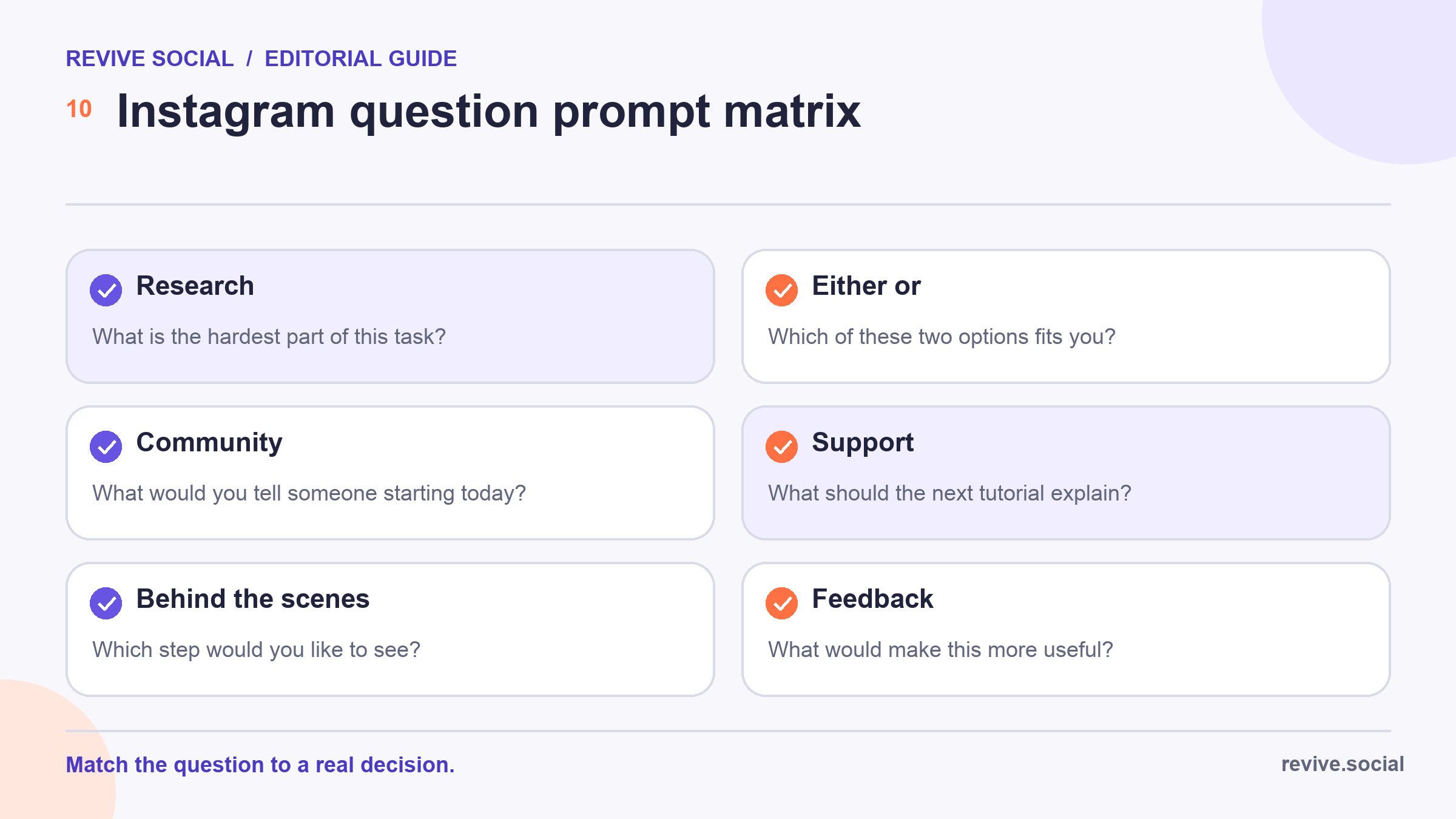
Questions about customers, products, and problems
Use this first group when you need language for content, product education, or support priorities. Keep the prompt broad enough to reveal something new, but narrow enough that a reply does not feel like homework. 🔎
- What is the hardest part of [specific task] right now? Use an open response when you need the audience’s own words.
- Which step in [process] needs a clearer tutorial? List two or three real steps in a Poll, or invite text replies.
- What nearly stopped you from trying [product or habit]? Use this to uncover uncertainty, not to request private purchase details.
- Which result matters most: [outcome A], [outcome B], or [outcome C]? Make the options distinct and include an “other” route when the format allows it.
These prompts can produce useful hypotheses, not final market truth. A reply from active followers may differ from the needs of customers who never see the post. Compare the themes with support records, site analytics, sales conversations, or other evidence before making a large decision.
Product and content choice prompts
- Which would you use first: [option A] or [option B]? Keep both options realistic and explain what the vote will inform.
- What question should the next FAQ answer? Collect questions, group duplicates, and answer the most useful themes.
- Which example would make this topic easier to understand? Offer contexts that match the audience, such as freelance, local business, or nonprofit.
- What would make [resource] more useful next time? Ask after people have had enough time to use it.
Close the loop when possible. Share the chosen tutorial, revised FAQ, or next experiment and acknowledge that the result came from audience input. That makes the question feel purposeful instead of extractive. ✅
Community, behind-the-scenes, and either-or prompts
Community questions work best when members can contribute experience without revealing private information. Behind-the-scenes prompts can also help you choose what to explain, as long as you do not expose customer data, confidential work, or employees who have not agreed to appear.
- What would you tell someone starting [task] today? Invite one practical lesson rather than a full life story.
- Which small win are you celebrating this week? Keep the topic suitable for public replies and moderate dismissive comments.
- What should the next behind-the-scenes post show? Offer safe choices such as planning, setup, quality review, or packaging.
- Which part of our process surprised you most? Use this after sharing enough context for an informed answer.
Low-friction choices are useful when the distinction itself matters. They are less useful when the audience needs nuance or when the options create a false binary. 🪄 Use the next four prompts as starting structures, not universal scripts.
- Quick guide or detailed walkthrough? Define what each version would contain.
- Watch live or catch the recap? Use the result for format planning, not as a promise of attendance.
- Template or worked example? Follow up by explaining when the resource will be available.
- What should happen next: [action A] or [action B]? Ask only when both actions are genuinely possible.
Use Question, Poll, Quiz, and caption formats deliberately
Interactive formats are not interchangeable. A Question sticker invites open text. A Poll captures a quick choice. A Quiz is designed around a correct answer, while an Emoji Slider captures a reaction along a scale. A caption prompt creates a public thread that other people can read and join.
The sticker tray evolves over time. The platform has continued adding and changing Story stickers, so feature availability and labels can differ by account or rollout.[2] Choose from the controls actually available to your account and avoid building a campaign that depends on an unverified feature. 🧩
Broadcast Channels and Instagram Live can support richer follow-up where they are available, but they require active moderation and a reason for people to stay. Check the current Instagram Live guidance before planning a live format.[3] Do not describe Live as universally available or promise that it will reach every follower.
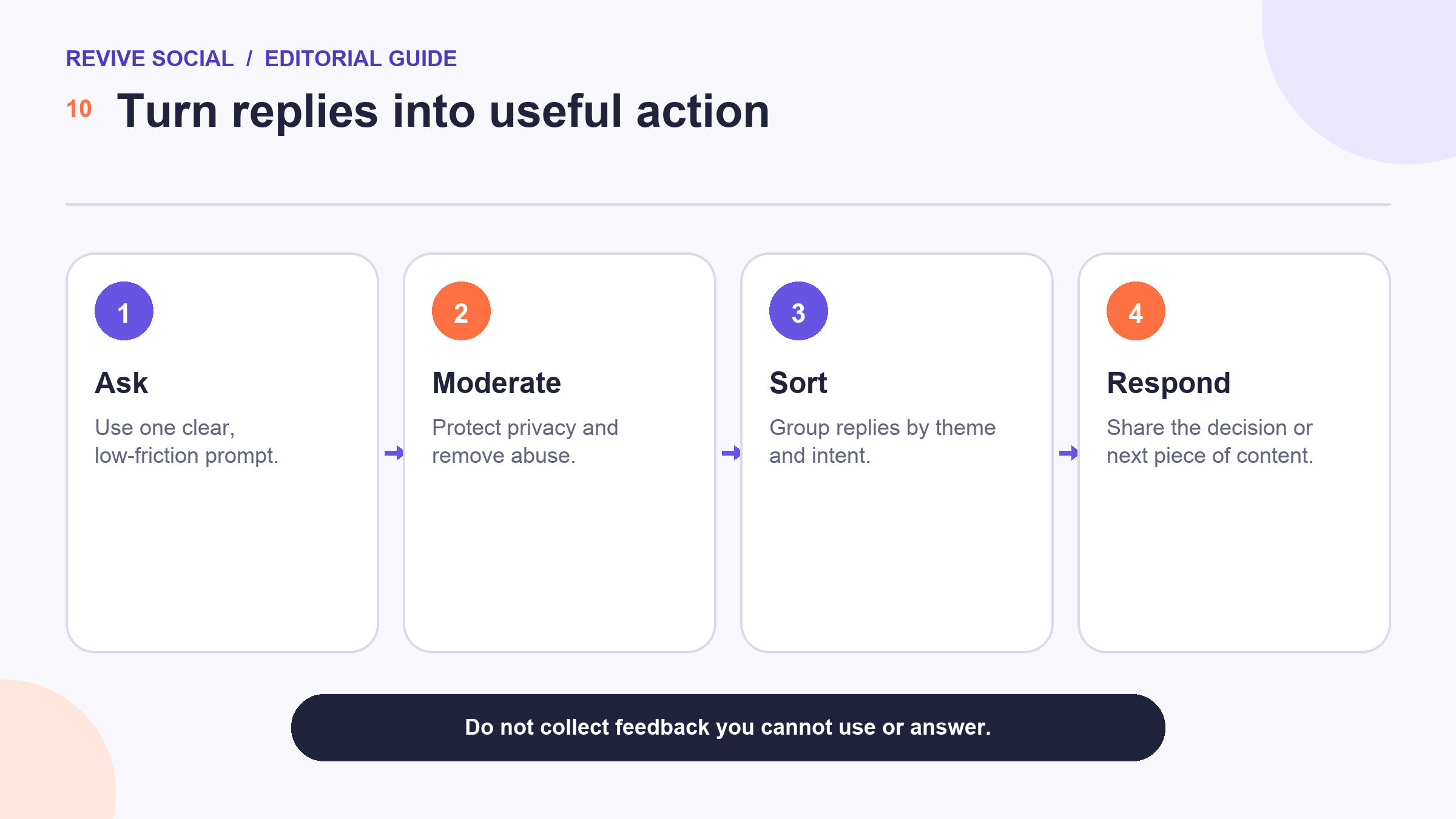
Moderate replies and protect participant privacy
Decide who will monitor the post before it goes live. Remove harassment, threats, impersonation, spam, and exposed personal data according to your moderation rules. Do not repost someone’s answer in a new creative without permission simply because you can see it in your account tools.
Avoid questions that pressure people to disclose health conditions, precise locations, financial circumstances, identity documents, or private account information. For customer support, move case-specific details into the approved private channel and explain what information should never be sent.
Plan for difficult replies too. A genuine question can reveal criticism that the team needs to address. Respond calmly, acknowledge what can be confirmed, and avoid turning a research prompt into a public argument.
Measure replies, saves, profile actions, and follow-up
Count responses only in context. Ten detailed answers can be more valuable than a larger number of one-tap reactions when the goal is customer research. Record the question, surface, audience context, response window, and themes so the result remains interpretable later. 📝
- Replies: useful when the goal is language, problems, or examples.
- Saves: useful when the post itself is a reference people may revisit.
- Profile actions: useful when the prompt introduces the account to new visitors.
- Follow-up actions: useful when people open a resource, join a relevant conversation, or use the result.
Use the guide to Instagram analytics for a broader measurement workflow. If the question specifically needs a quick choice, continue with the focused guide to Instagram Story polls. For long-lived profile navigation, the guide to Instagram Highlights covers a different job.
Most importantly, publish the follow-up. Tell people what was learned, what will change, and what will not. That final step turns an Instagram question from engagement bait into a useful exchange. 🌱
Rotate prompt families instead of repeating the same either-or format. A monthly plan might include one research question, one community lesson, one support prompt, and one low-friction choice. Record which questions produced usable themes, not merely the largest response total.
Retire a prompt when the answer is already known or the team cannot act on it. Asking the same question without acknowledging earlier replies can make participation feel performative rather than collaborative.
References
- [1] Instagram: Introducing polls in Instagram Stories
- [2] Meta: New stickers in Instagram Stories
- [3] Instagram Help Center: Live guidance

